QuickPad
(To be called Klumbu Pad)

Notepad enhanced
About QuickPad

QuickPad was designed as a replacement for Notepad and brings new, exciting features such as the ability to run scripts directly.

QuickPad also provides the possibility to insert rare characters in your text files and to search Google directly from its interface. Not only does it have more features and a nicer interface than Notepad, it also has a nice start screen which can be run from the start menu in the QuickPad application folder which offers you a nicer and less complex decision on what to do. From there you can create, modify, save and even run text files as scripts. Using the Snips menu you can insert characters and even search Google with the selected text.
You can also customize the start screen and the QuickPad interface itself. With all these functions you can also enjoy QuickPad in a different language such as French just by downloading a small file and selecting it inside QuickPads properties.
Now with full screen mode and faster start up!!!

Why get QuickPad instead of using other solutions?

QuickPad is a free, fast secure and small application but with a twist. QuickPad not only allows you to change the interface's language but also allows you to run vbs (Visual basic script) scripts within the program itself. With all these features; not only do you get this all for free but you also allows you to export your documents as a QuickPad file (.qpf) which is encrypted so your documents are more safe and secure than any text file!

Why get QuickPad?

Fancy and customizable!

Customizable, double-click to change the image.

In-program language change and update
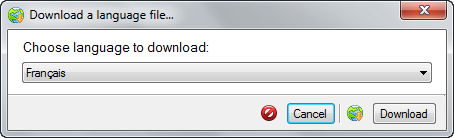
QuickPad 2.2.1.0 or above allows you to download and apply a QuickPad language file directly.

This feature is only available in version 2.2.1.0, to update QuickPad; click help and then click check for updates. When all updates are listed, only check the most recent version and click next. Wait for installation to complete and that's it!

Download QuickPad

  Download Information:

  • Works with Windows 8, Windows 7, Windows Vista and Windows XP
  • Requires .Net Framework 3.5 and at least 500 MB RAM (Random Access Memory)
  • Windows XP is now supported via update 2.4.0.0
  • QuickPad doesn't support Windows XP due to some components used.
  • Quicker start up time and language loading delay has decreased. Many language tweaks.
Download